Track Every Cash-Secured Put, Roll and Covered Call in One Spreadsheet
Theta Wheel Book records each step of your wheel trades (puts, rolls, assignments, dividends, covered calls and call-aways) and works out your adjusted cost basis, cash allocation, realized and unrealized P/L and annualized returns for you.
Buy the Tracker — $19One-time price: $19 · Instant download · Excel & Google Sheets
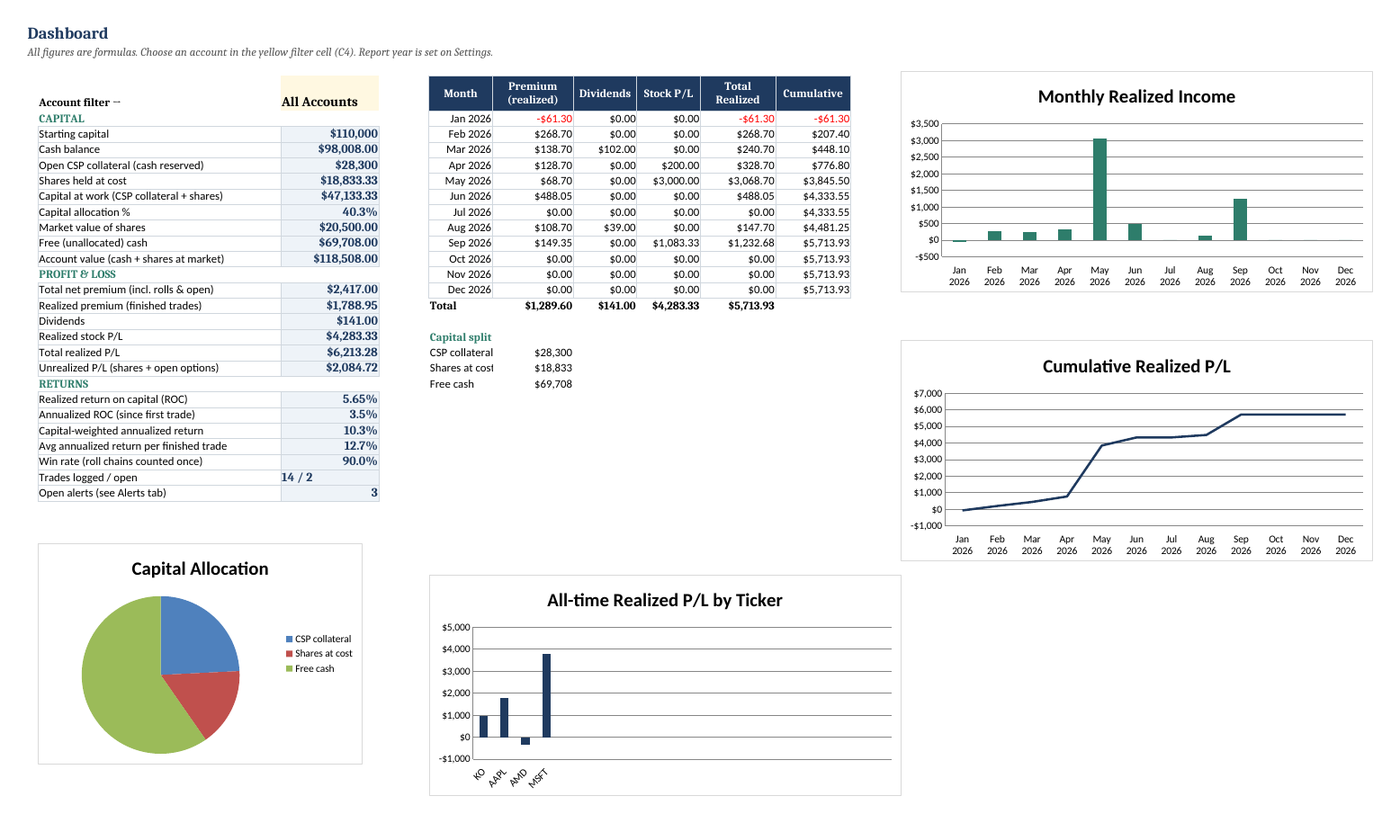
Educational tool, not financial advice. Screenshots show hypothetical example rows, not real trades or expected results.
How it works
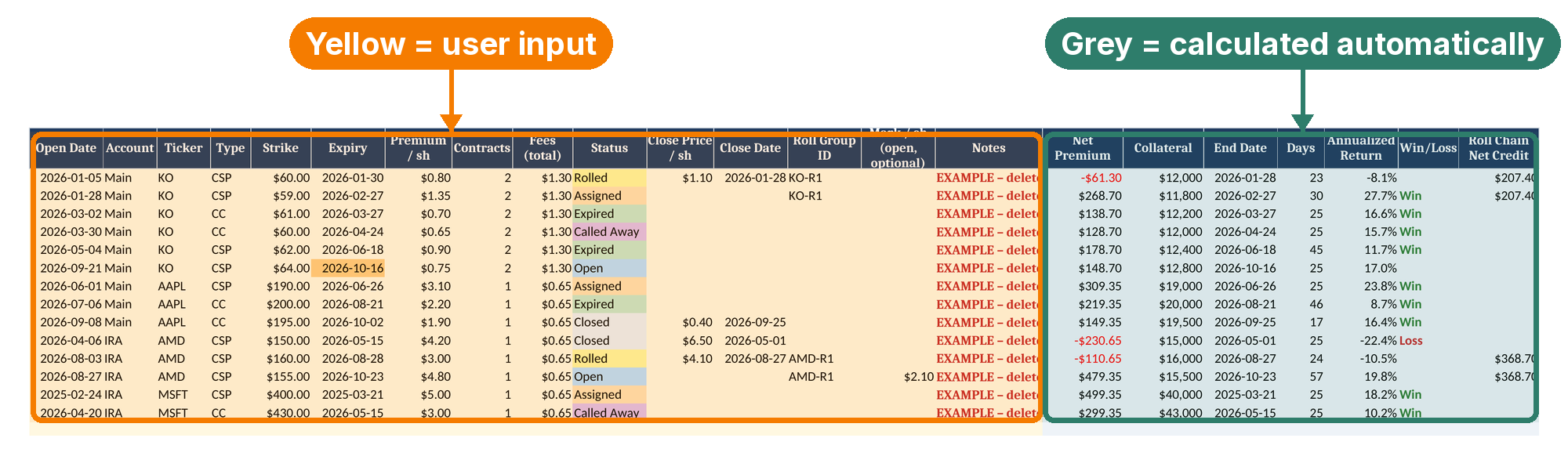
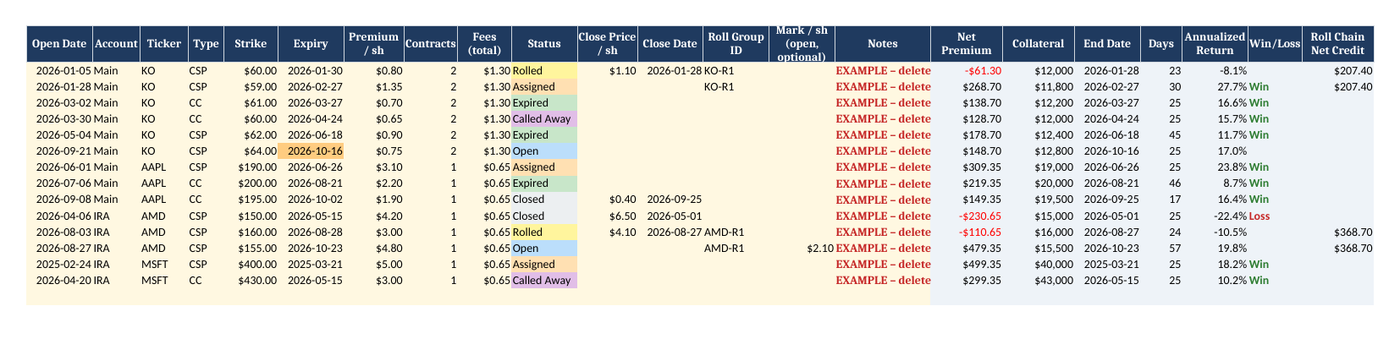
1Log a trade on the Trades tab. Yellow columns are user input: date, account, ticker, type, strike, expiry, premium, contracts, fees and status. The grey columns work out net premium, collateral, days held, annualized return, win/loss and roll-chain credit for you. 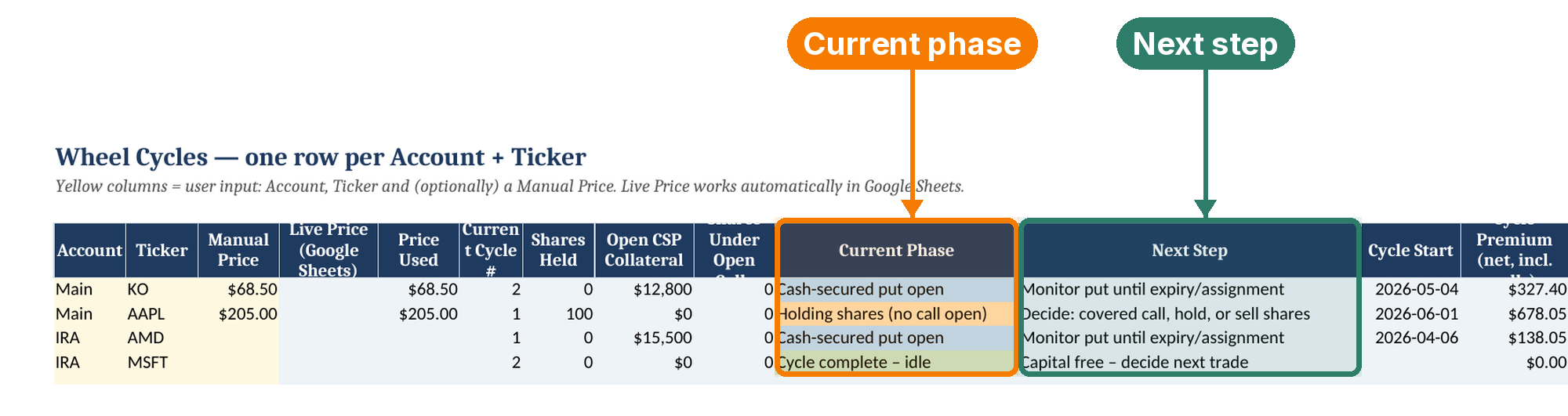
2See each wheel's phase and next step. Wheel Cycles shows one row per account + ticker: whether you're in the put phase, holding shares, or have a call open, plus the next step in the process, cycle P/L and adjusted cost basis. 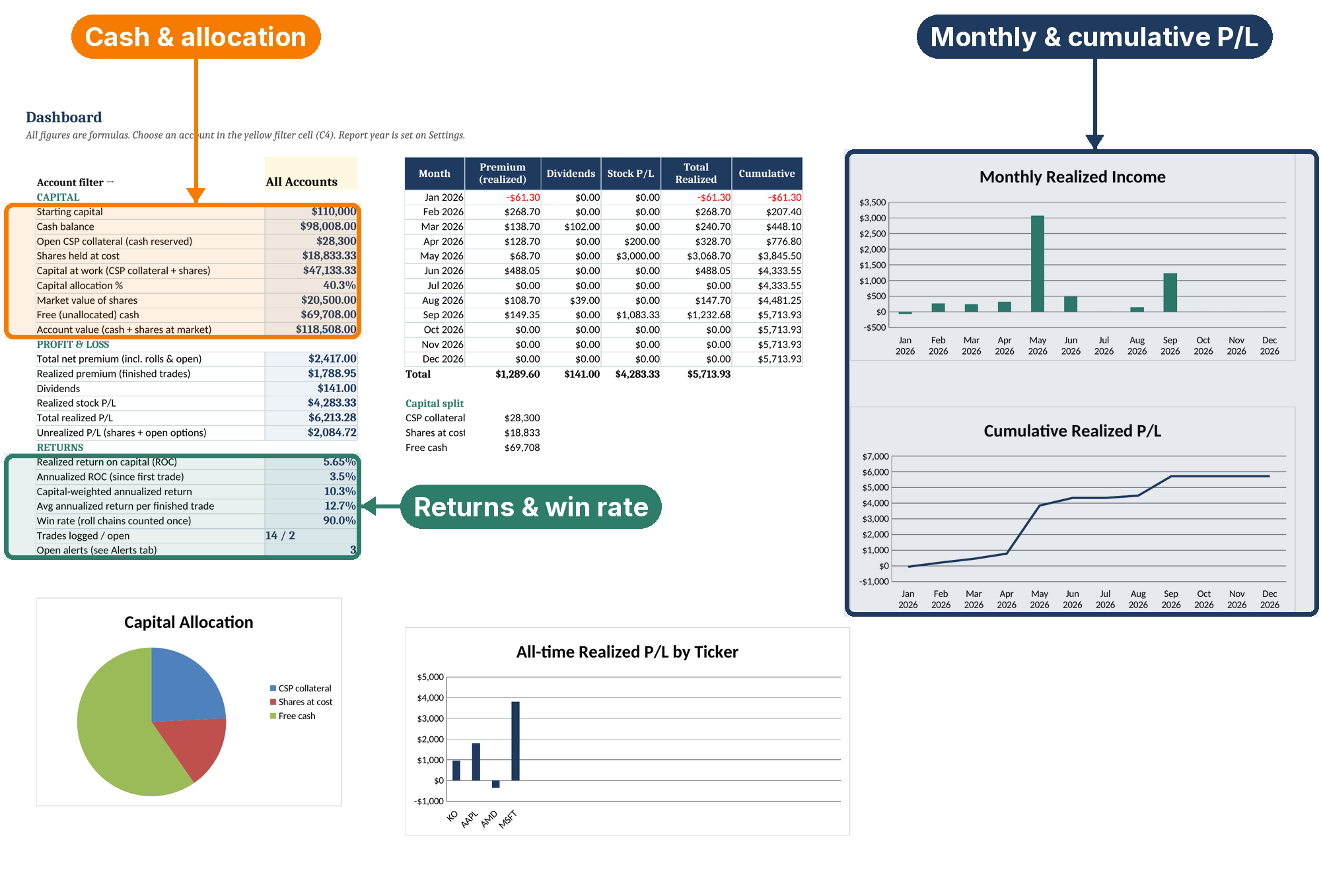
3Read your totals on the Dashboard. Cash balance, capital allocation, realized and unrealized P/L, return on capital, capital-weighted annualized return and win rate, plus monthly and cumulative P/L charts. Filter by account. 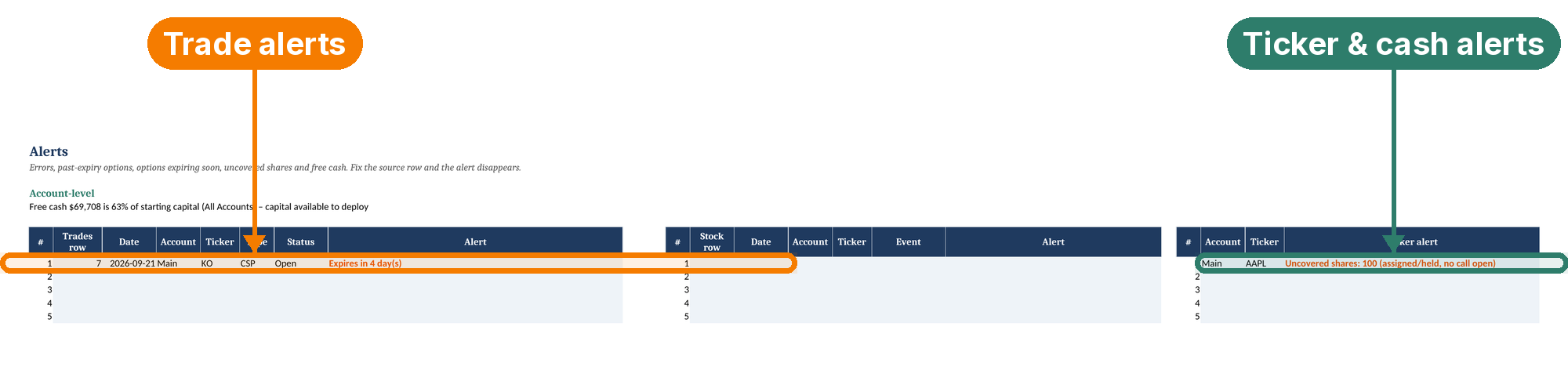
4Catch problems with Alerts. Data-entry errors, options past expiry, options expiring soon, uncovered shares and free cash are listed in one place. Fix the source row and the alert clears.


Screenshots are real renders of the spreadsheet with hypothetical example data. Educational tool, not financial advice.
Why traders outgrow their brokerage screens
See your real break-even
Brokers show the strike you were assigned at. Theta Wheel Book nets every put, call, roll, dividend and fee for the cycle so you see your adjusted basis.
Know where your cash is
See how much is reserved for puts, tied up in shares, and free, per account or across all of them.
Compare trades fairly
Annualized and capital-weighted returns put a 7-day trade and a 45-day trade on the same yearly scale.
Keep your data private
It's just a file. No account, no broker connection, no tracking. Your trades stay on your computer or your own Google Drive.
What's inside the spreadsheet


Full wheel cycle tracking
CSPs, rolls, assignment, covered calls, call-aways and closes. Each Account + Ticker gets an automatic cycle number, current phase and a plain-language 'next step' in the process.
Rolls done properly
'Rolled' status plus a Roll Group ID links every leg. See net credit per chain; roll debits and credits flow into premium, cost basis and returns.
Real adjusted cost basis
Break-even per share after every premium, roll, dividend, fee and outside share purchase or sale — per cycle, not just the assignment strike.
Cash & capital allocation
Starting capital per account, cash balance, CSP collateral reserved, shares at cost, capital-at-work %, free cash and account value.
Realized vs. unrealized
Realized premium, dividends and stock P/L kept separate from unrealized share gains (with your price) and open options (optional mark).
Returns that mean something
Return on capital (realized and annualized), annualized return per trade, capital-weighted annualized return, cycle annualized return and a win rate that counts roll chains once.
Alerts
Data-entry errors, options past expiry still marked Open, options expiring soon (future dates only), uncovered assigned shares, calls exceeding shares, and free cash available.
Cycle History & Ticker Detail
Every completed cycle with P/L, capital, days and annualized return. Pick any account + ticker to see its whole history on one tab.
Year-End summary
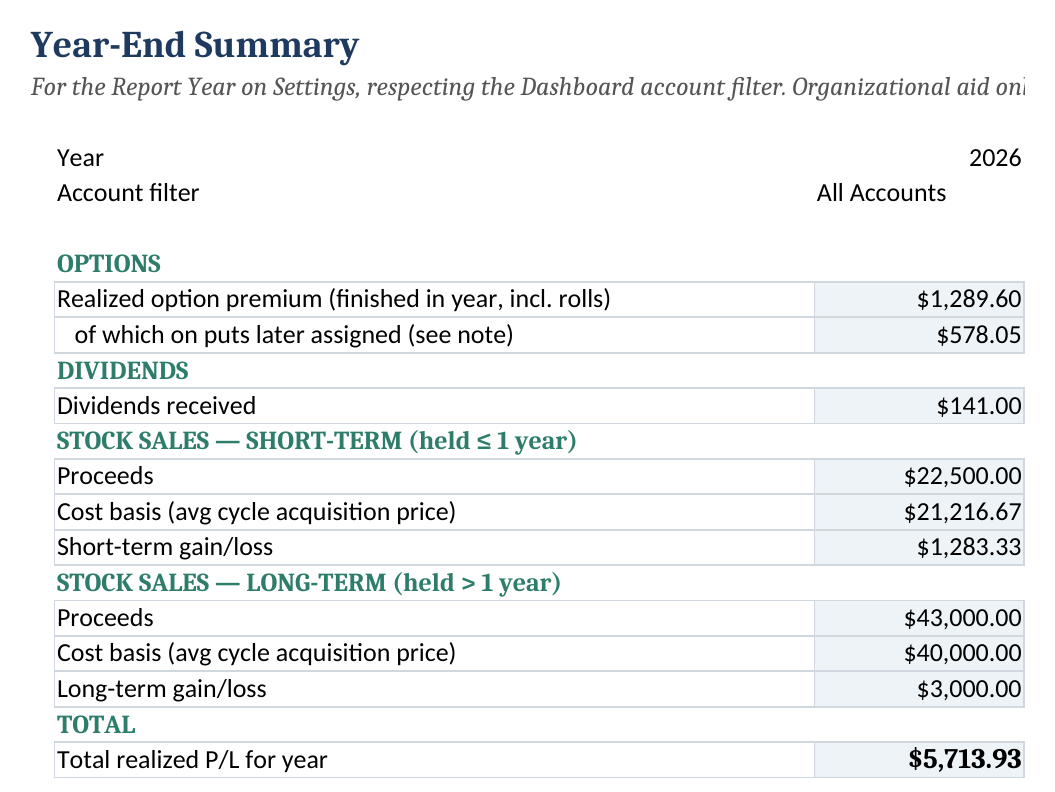
Realized premium, dividends and stock sales split into short-term and long-term for the year you choose (an organizer, not a tax form).
4 charts
Monthly realized income, cumulative realized P/L, realized P/L by ticker and capital allocation.
Multi-account filter
Tag trades by account (taxable, IRA…). One dropdown re-scopes the Dashboard, Year-End and charts.
Built to be trusted
Formula-driven (no hard-coded results), 1,000 trade rows, dropdown validation, frozen headers, colour-coded cells (Yellow = user input, Grey = calculated automatically), and a step-by-step Instructions tab.
Theta Wheel Book Options Tracker
- ✓ One .xlsx for Excel 2019/365, LibreOffice & Google Sheets
- ✓ 10 tabs: Dashboard, Trades, Stock & Dividends, Wheel Cycles, Cycle History, Ticker Detail, Alerts, Year-End, Settings, Instructions
- ✓ Worked example included · one-time payment
$19
Buy the Tracker — $19Payment and any applicable sales tax/VAT are handled by our checkout provider. See Terms of Sale & Refunds.
Learn the method first
New to tracking the wheel? Read our free guide: How to Track the Options Wheel Strategy (Cost Basis, Premiums, Returns).
Frequently asked questions
What exactly do I get?
One downloadable .xlsx workbook with ten tabs: Instructions, Dashboard, Trades, Stock & Dividends, Wheel Cycles, Cycle History, Ticker Detail, Alerts, Year-End and Settings. The same file opens in Microsoft Excel 2019/365, LibreOffice and Google Sheets (File → Import).
Does it handle rolls?
Yes. Mark the old leg 'Rolled' with its buyback price, give both legs the same Roll Group ID, and log the new leg. The chain's net credit is shown on each leg, every leg flows into cycle premium and adjusted cost basis, and the win rate counts each roll chain once.
Can I track dividends and shares I buy or sell myself?
Yes. The Stock & Dividends tab logs dividends plus share purchases and sales outside of assignment. They feed shares held, adjusted cost basis, cash balance, realized P/L and the year-end summary.
Does it get live prices?
In Google Sheets, the Live Price column uses GOOGLEFINANCE automatically (quotes can be delayed). In Excel or LibreOffice that function isn't available, so the column stays blank without errors and enter a Manual Price (user input) instead. It never connects to a broker.
Can I track more than one account?
Yes. Name up to 10 accounts with their starting capital in Settings, tag each trade with an account, and use the Dashboard filter to see one account or all of them.
Will this tell me which options to sell?
No. Theta Wheel Book is an impersonal record-keeping tool. Its 'Next Step' column only describes where you are in the wheel process (for example 'shares held, no call open'); it never recommends a ticker, strike, expiry or trade, and it is not financial advice.
How is adjusted cost basis calculated?
Per wheel cycle: share purchases minus share sales, minus all net option premiums (including roll debits and credits) and dividends, divided by shares held. It's your break-even for the cycle — a tracking figure, not your tax basis.
Is the year-end summary tax-ready?
No. It splits stock sales into short- and long-term using an estimated holding period and average cycle cost, which can differ from your broker's Form 1099-B. Use it to organize records and talk to a tax professional.
Which versions of Excel are supported?
Excel 2019, Excel 2021 and Microsoft 365, plus Google Sheets and LibreOffice. It uses MINIFS/MAXIFS, which Excel 2016 and earlier don't support.
What is your refund policy?
Because this is an instantly downloadable digital file, please see our Terms of Sale & Refunds page for the exact policy. If the file is defective or will not open, contact us and we will make it right.